Guide
Minimalist note taking: a simple method and apps
Minimalist note taking means keeping notes in one place, in plain text, writing things down first and skipping the filing. You can use it for ideas, reminders and scraps you want to find again without building a system around them. This guide covers the rules, moving from scattered notes, finding things later and choosing an app.
What is minimalist note taking?
Pick one place for the notes you make throughout the day. Write a thought there as soon as you need to, without choosing a folder or filling in a template. Return to the same place when you want to find something or see what still needs your attention.
Your place can be one long document, or a single list of separate notes. A book recommendation might take one line; a problem you're thinking through might need a few paragraphs. You can mix them. The point is to remove the decisions between having a thought and writing it down.
Andrej Karpathy describes a version called append-and-review: add new entries at the top of one note, skim older entries now and then, and copy anything still useful back to the top. You can use the same habit with separate notes by moving the ones you want to revisit back up your list. Either way, review gives old thoughts another chance to catch your eye.
What are the rules of minimalist note taking?
- Choose one place. Put new personal notes in the same document or list, so you know where to write and where to look.
- Write first. Put the thought down in your own words without deciding on a folder or template.
- Use plain text. Write a line or paragraph you can read in an ordinary text editor; add formatting only when it helps you read.
- Search and skim. Look for a word when you know what you need, and scan your notes when you don't.
- Delete freely. Remove a finished reminder or a scrap you no longer need, and leave the rest alone.
A shopping list can sit beside an idea for a present. Keep a receipt or shared document elsewhere if you need to; your place for everyday capture can still stay simple.
For a first entry, try writing the thing you keep telling yourself to remember. Give it enough context to make sense next week: Dentist: ask about the chipped tooth will be easier to recognise than dentist. Then close the app. You don't need to process the entry into another system.
How do I start if I already have notes everywhere?
Pick the place you want to use from today. It should be easy to open where you usually have ideas, whether that's your phone or a computer. Create one note or pick one list, and put the next thought there.
Stop adding new personal notes to the other places. Leave old material where it is; you don't need to sort it before starting.
During the first week, copy over only the old notes you actually use. If you look up a recipe or a project idea and expect to need it again, bring that note across. Leave the rest in the old app, where you can still search for it. At the end of the week you'll have a working place for new notes and a small collection that has already proved useful.
How do I find things without folders or tags?
Search for a distinctive word from the note. A name, a place or the subject of a conversation gives you a better starting point than a broad word like idea. Include that useful word when you write, while the context is fresh. You can also add a few words later if a search comes up empty.
For things you expect to collect, start with a consistent word and a colon: read:, watch: or todo:. Searching for read: brings those entries together without making you move them into a reading folder. Use a prefix when it helps; a note doesn't need one to belong in the list. I've written more about prefixes as a tiny system.
Set aside a little time to skim from the top. You might find a task you can do today, a book you want to borrow or an idea that now fits a project. Bring the useful ones forward and let the others stay where they are. You don't have to read the entire history or make a decision about each entry.
Search and skimming do different jobs. Search helps when you remember what you're looking for. A skim can remind you of something you had forgotten to look for at all. Try a quick look at the end of the day.
What does minimalist note taking not suit?
A large reference library may need a structure that helps you browse a subject you can't name in a search. If you're keeping manuals, research papers or a collection of sources for years, folders and metadata may earn their upkeep. Keep that library wherever you can find and maintain it.
Shared work has different needs too. A team may need permissions, comments and a clear place for the current version of a document. Long documents such as reports or manuscripts also benefit from tools made for drafting and editing them. Use a separate home for those jobs and keep your capture place for the thoughts leading up to them.
Which apps suit minimalist note taking?
The method works in any place where you can write and find text. These four choices differ in how much they do for you. Prices checked in November 2026.
Apple Notes in a single folder
Apple Notes is free. Choose one folder for new notes, or keep one long note inside it, and ignore the filing features you don't need. It is a convenient starting point if you already use an iPhone, iPad or Mac; Apple also lets you access iCloud notes on iCloud.com.
You give up some of the simplicity of a purpose-built capture app: the other folders and tools remain available, and you'll need to keep returning to your chosen place. If you use iCloud, its storage allowance is shared with your other iCloud data and extra storage can cost money. Apple Notes also handles scans, drawings and shared notes, so pick it over Gravity if you need those.
Simplenote
Simplenote is free and syncs notes across iOS, Android, Mac, Windows, Linux and the web. Write separate text notes and use search to find them; you can leave its optional tags alone. Its help page says you can't add attachments such as images or PDFs to notes. Pick another home if those are part of what you need to keep.
A plain text file
A .txt file in a text editor gives you one place to write without an account or a new notes app. Put each new entry at the top and separate it from the last with a blank line. The file itself costs nothing to create with an editor you already have.
You take responsibility for storing the file, backing it up and getting it onto another device if you want it there. You also have to move an entry yourself when you want it back at the top. For a short list of thoughts, that may be all the work you need.
Gravity
Gravity is the notes app I built for the append-and-review habit Andrej Karpathy describes. It keeps separate notes in one list: new notes go at the top, older ones sink and a swipe right brings a note back. There's no folder to choose before writing.
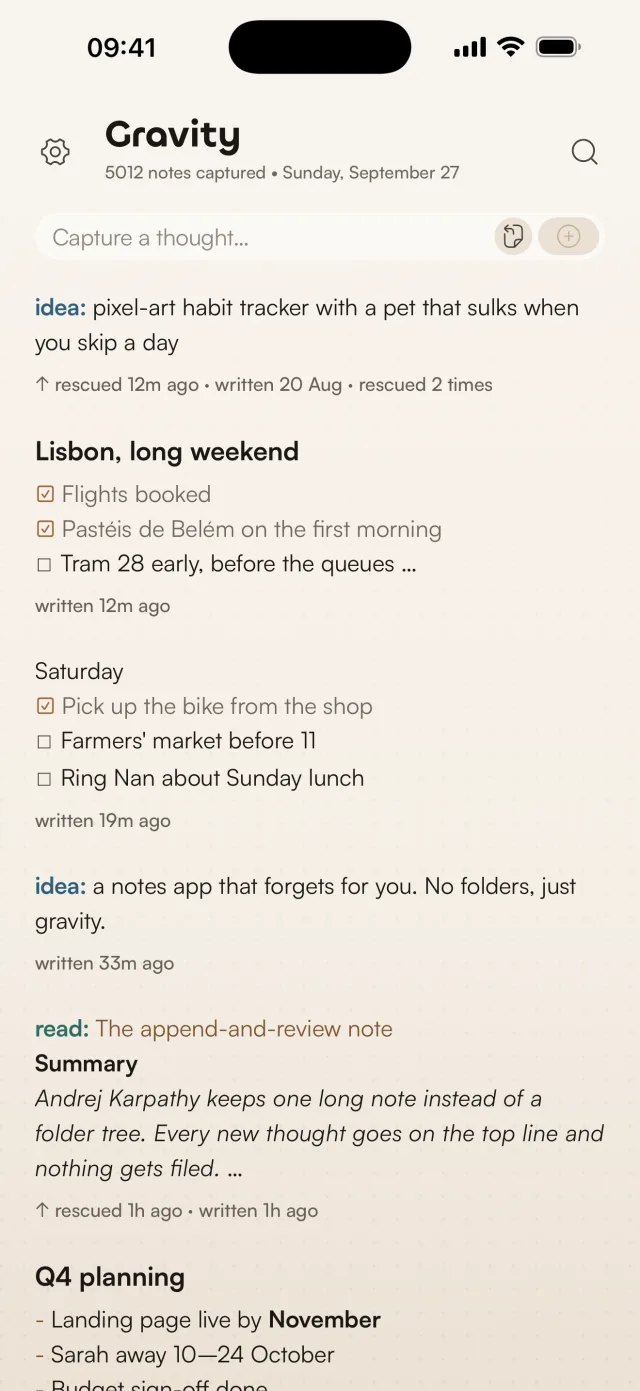
Search works offline, and you can start a note with todo: or read: to find it again by prefix. Gravity is on iPhone, iPad, Mac and Android. Notes sync between iPhone, iPad and Mac through iCloud, or across those and Android with Gravity Sync. If you're on Android, Gravity Sync is how that works. The app is $9.99 per platform. iCloud sync between iPhone, iPad and Mac is free, and Gravity Sync, which adds Android and your AI apps, is free during the beta and becomes a subscription after it.
Gravity has no folders, links between notes or collaboration. It's for capturing fast and reviewing later, not for building a knowledge base, so if you need a shared workspace or a large archive, use a tool built for that work. You can export your notes as Markdown or JSON if you want to take them elsewhere.
Frequently asked questions
What is the easiest note-taking method?
Choose one place, write a note when something comes to mind and look back through it now and then. A single document or a list of separate notes both work. Start with whichever you can open without thinking about where the note belongs.
What is the best minimalist note taking app?
Apple Notes suits someone already using Apple devices who wants to start in one folder. Simplenote suits someone who wants free sync across several platforms, Windows and Linux included. A text file suits someone happy to manage a file. Gravity suits someone on iPhone, Mac or Android who wants one list designed around capture and review.
Is minimalist note taking good for ADHD?
This approach removes the decision about where a note goes before you write it. Whether that helps you will depend on how you like to capture and revisit thoughts. For more on the choices involved, read why most note-taking apps don't work for ADHD.
Can I take minimalist notes on paper?
Yes. Use one notebook for new notes and add a date or a useful first word when you want context later. You'll need to flick through pages to find an entry, so paper suits a habit where you enjoy reviewing by hand.
How many notes apps should I use?
One home for everyday capture is enough to try the method. You can still use another app for shared documents or a reference library; the useful distinction is knowing where your next quick thought goes.