Blog
Prefixes: a tiny system that works
Gravity has no folders and no tag manager. I've written about why I keep saying no to folders: categories need upkeep, and upkeep slowly replaces the thinking you opened the app to do.
Sometimes you do want to filter, though. You want your to-dos and nothing else, or the list of things you meant to read. You can have that without a tagging system. Type a word and a colon at the start of the note.
What a prefix looks like
Three notes from my stream:
todo: email Jake about the API docs
read: https://karpathy.bearblog.dev/the-append-and-review-note/
idea: what if the archive had its own gravity?
A prefix is a word, a colon, then the note. There's no dropdown, no autocomplete and no tag database. You type into the same box as always.
Gravity treats that first word as a tag and does two small things with it. The tag gets a colour of its own, so a todo: stands out when you scroll past it. And typing todo: into search pulls up your to-dos. Search read: and you have a reading list.
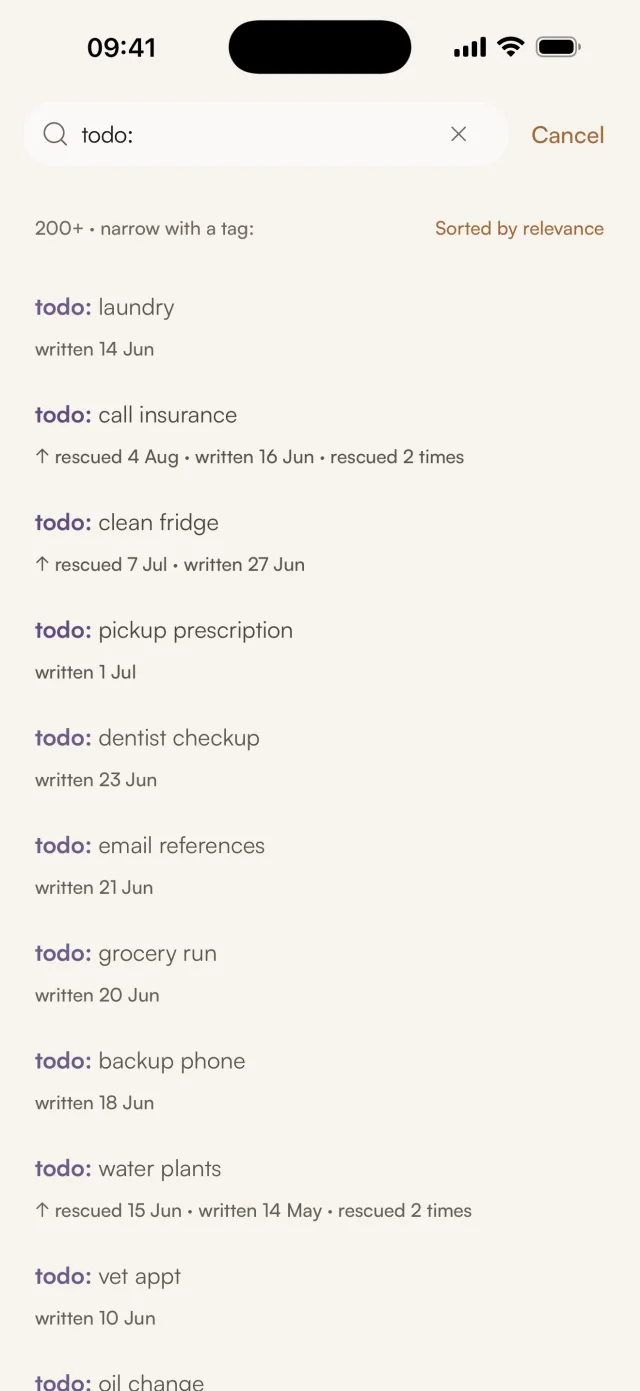
I didn't invent this. Andrej Karpathy describes the same habit in his append-and-review note: he starts entries with "watch:", "listen:" or "read:" so he can find something to watch late at night or read on a flight. Gravity copies it and adds the colour.
Why the colon matters
Without a delimiter you get false matches. A note that says "I need to figure out what to do about the API" contains the letters t-o-d-o, and it isn't a task. Nobody types todo: in the middle of a sentence by accident, so searching for it returns only the notes you marked on purpose.
Why not proper tags?
Tags look like the correct answer here. I've used them for years in other apps, and three things went wrong every time.
The first is consistency. Is it #todo or #todos? #toread, #to-read or #reading-list? A tagging system treats each spelling as a different tag, so you either look up which one you used or end up with five versions of the same idea. Prefixes could have the same problem in theory. In practice I use four, they're short, and I type them several times a day, so my fingers keep them consistent. I have never typed todoo:.
The second is obligation. When an app has a tag field, every note asks whether you should fill it in. The field sits there empty and makes you feel you're doing it wrong. A prefix is a habit you can pick up or ignore. If you never use one, nothing in the app looks unfinished.
The third is subtler. A tag is metadata stored beside the note, so it can drift away from what the note says. You tag something one way, edit it into something else, and the tag stays behind. A prefix is the first word of the note. When you read todo: email Jake you see one line of text, and the label can't disagree with the content because it is the content.
The four I use
Each of these earns its place by being useful at least once a week.
todo:is something I need to do. It's a quick "don't forget this". When I review the stream and see a finishedtodo:, I swipe left and tap Archive. If it still matters, I swipe right and it goes back to the top.read:is a link or reference for later: an article, a paper, a video. It means I found it interesting enough to keep and haven't got to it yet.idea:is a half-formed thought I want to leave to marinate. These sink faster than anything else, and most of them stay sunk. The ones that keep catching my eye on review might turn into something.buy:is things to buy. It's dull and useful. Before I order anything online I searchbuy:to see what else I've been meaning to get.
If a note doesn't fit any of them, it gets no prefix and goes into the stream like everything else.
For information that's important and boring, like a policy number or a door code, a ref: prefix works well. Those notes can sink out of your daily scroll and still turn up the moment you search for them.
What if you forget the prefix?
Nothing breaks. In a tagging system, an untagged note disappears from every tag view, and you've made a hole in your system without noticing. In Gravity, a note without a prefix is still in the stream. You'll pass it when you review. The only thing you lose is the shortcut to it through search.
Prefixes add a way in. The stream works without them.
When to stop adding prefixes
You could add more: quote: for lines worth keeping, project: for work, meeting: for call notes, journal: for reflections. I'd resist.
Prefixes work because there are few enough of them to become automatic. With four, your fingers know the patterns. With eight, you pause at capture to decide which one applies, and that pause is exactly what Gravity is trying to remove.
Before adding a prefix, ask whether you need to filter that kind of note often enough to justify it. Usually you don't. Most notes never need filtering. They go into the stream, you see them on review, and they sink once they stop mattering. YAGNI is a good rule for personal systems as well as software.
How the habit builds
After a few weeks you stop deciding whether to prefix something. todo: becomes part of how you write a task, the way you'd capitalise the start of a sentence. Psychologists call this automaticity: a behaviour practised until it no longer needs conscious attention.
The searches turn into habits too. About to run errands? Search buy:. Twenty minutes on a train? Search read:. Checking what's outstanding? Search todo:. There's nothing to navigate and nothing to maintain, so the system doesn't decay when you have a busy month and ignore it.
Try it this week
- Pick one prefix. Choose the one that matches how you already use notes:
todo:if you capture a lot of tasks,read:if you save a lot of links,idea:if you collect half-thoughts. - Use it for a week without searching for it. Get used to typing it when it applies.
- After a week, type the prefix into search and look at what comes back.
- Add a second prefix only when you catch yourself wanting to filter something else.
Aim for as much structure as you use and no more. For me that's four short words.