Blog
Why your notes app is backwards (and what Karpathy does instead)
Most note-taking apps ask the same question before you've written a word: where does this go? Which folder, which tag, which notebook, which other notes it links to. The assumption is that organisation is the hard part, and that your notes become useful once you get it right.
Andrej Karpathy skips the question. He keeps everything in one note, adds new things at the top, and every so often scrolls down to rescue what still matters. He described the method on his blog on 19 March 2025 and called it the append-and-review note. It changed how I thought about capturing ideas, and it's the reason Gravity exists.
What is Karpathy's append-and-review note?
The append-and-review note is a note-taking method where you keep a single running note, add every new thought to the top, and scroll down now and then to review it. Anything that still deserves attention gets copied back to the top. Everything else sinks, "almost as if under gravity", in Karpathy's words, and stays searchable.
He says the approach has worked for him "quite well for many years" and that it "captures the majority of day-to-day note taking use cases".
Who is Andrej Karpathy?
Andrej Karpathy did his PhD at Stanford, was one of the founding members of OpenAI, and was director of AI at Tesla, where he led the computer vision work behind Autopilot. He teaches deep learning through his "Neural Networks: Zero to Hero" series and founded Eureka Labs, an AI education company.
What interests me is the contrast. Someone who builds some of the most complicated software in the world keeps his own notes in one plain text note in Apple Notes.
The Karpathy method, step by step
His post describes one data structure and two habits. I split the second habit in two, because rescuing is the part most apps get wrong.
One note
Karpathy keeps a single text note in Apple Notes, called "notes". He explains why in one sentence: "Maintaining more than one note and managing and sorting them into folders and recursive substructures costs way too much cognitive bloat." One note also makes search trivial. Ctrl-F covers everything, and nothing can be in the wrong place because there's only one place.
Append
"Any time any idea or any todo or anything else comes to mind, I append it to the note on top, simply as text." He adds from his computer while working and from his iPhone on the go. He doesn't add dates, links or tags, with one exception: short prefixes like "watch:", "listen:" and "read:", so he can search for something to watch late at night, listen to on a run or read on a flight.
His examples are ordinary on purpose. A film someone mentions at a party. A book review he sees on X. The morning's to-do list. A tweet that needs more thought. The shell command he keeps forgetting. The commands and results from a hyperparameter sweep.
Review
As new entries go in at the top, older ones sink towards the bottom. Every now and then he scrolls down and skims. He isn't hunting for anything in particular. He's checking what still catches his attention.
Rescue
"If I find anything that deserves to not leave my attention, I rescue it towards the top by simply copy pasting." Sometimes he merges, groups or rewrites notes that turn out to be related. He deletes a note only rarely. "Notes that repeatedly don't deserve attention will naturally continue to sink. They are never lost, they just don't deserve the top of mind."
That's the whole Karpathy method: one note, new things at the top, and a regular skim to lift back up whatever still matters.
Why it works
Organising feels productive. Every folder is a decision, though, every tag is a vocabulary you have to keep consistent, and every link is a relationship you have to remember. Each cost is small. Together they add up, and you end up tending the system instead of using it.
One note removes those costs, and review does something less obvious on top. Ideas that don't survive a second look sink, and ideas that keep catching your eye get lifted back up. You decide what's important later, when you know more, instead of at the moment of capture when you know least.
Karpathy describes what writing a thing down does for him: "When I note something down, I feel that I can immediately move on, wipe my working memory, and focus fully on something else at that time. I have confidence that I'll be able to revisit that idea later during review and process it when I have more time."
There's research behind that feeling. The Zeigarnik effect is the old observation that unfinished tasks stay on your mind. A 2011 study by E. J. Masicampo and Roy Baumeister found that making a concrete plan for an unfinished goal reduced how much it intruded on people's thinking. Writing a thing down, with a reliable way back to it, works the same way.
How Gravity does it
I kept rereading Karpathy's post. The method made sense, and Apple Notes made it harder than it needed to be. Rescuing a note meant selecting the text, cutting it, scrolling back to the top and pasting. Reviewing meant skimming one enormous block of text. So I built an app around the method.
Gravity keeps every note in one stream, newest at the top. Each entry is its own note, so you rescue, archive or search one thought at a time. A Sunday morning looks like this:
idea: pixel-art habit tracker with a pet that sulks when you skip a day
  ↑ rescued 12m ago · written 20 Aug · rescued 2 times
Lisbon, long weekend: flights booked, Pastéis de Belém, Tram 28 early
  written 12m ago
Saturday: bike from the shop, farmers' market before 11, ring Nan
  written 19m ago
idea: a notes app that forgets for you. No folders, just gravity.
  written 33m ago
read: The append-and-review note
  ↑ rescued 1h ago · written 1h ago
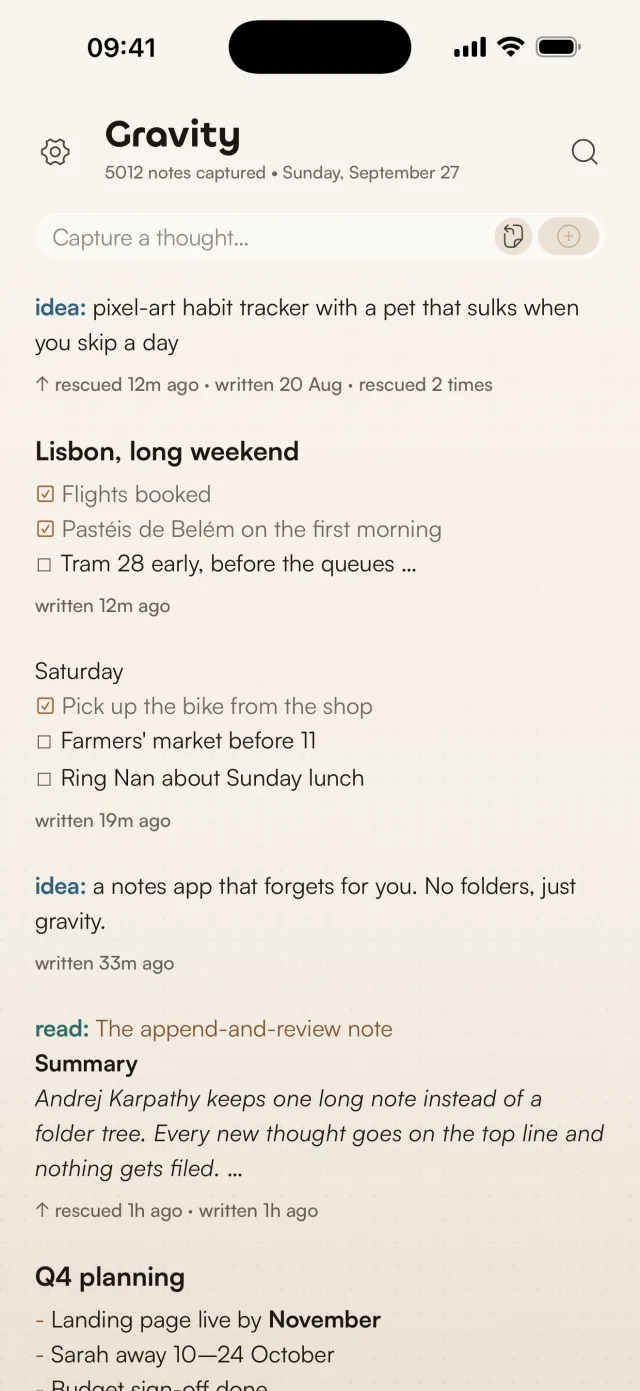
Appending takes no decisions. When you open Gravity the cursor is already in the capture box at the top. Type, press Return twice, and the note is saved. The home screen widget and the share sheet drop notes straight into the stream, and on the Mac, Option-Space opens a capture panel from any app.
Rescue is one gesture. Swipe a note right on iPhone, iPad or Android, or press R on the Mac, and it jumps to the top marked "rescued just now", with the date you wrote it and how many times you've rescued it. The idea at the top of the screenshot below was written on 20 August and has come back up twice. Swipe left to archive, delete, share or copy. Editing a note doesn't move it, so fixing a typo doesn't count as a rescue.
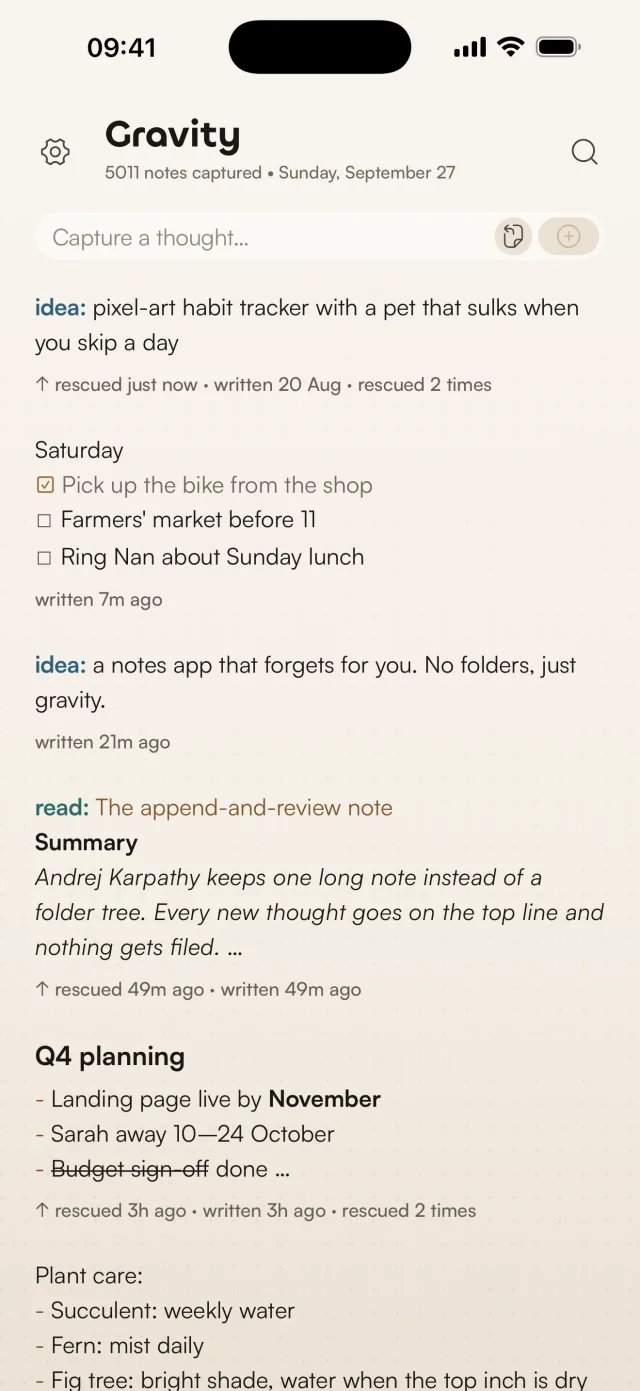
Sinking is visible. On iPhone, iPad and Android, a note's text turns lighter in steps a week, three months and a year after you wrote or last rescued it. A rescue makes it dark again, so the stream shows at a glance which notes you've been paying attention to.
Karpathy's prefixes work as tags. Start a note with read: or watch: and the prefix gets its own colour. On iPhone, iPad and Android, search lists your tags, and tapping one shows only those notes. I've written more about how I use prefixes. Search replaces Ctrl-F: it runs offline, matches the start of words, ignores accents and can include archived notes.
On the Mac, Gravity lives in the menu bar, with the stream in a sidebar and the selected note open beside it. R rescues, A archives.
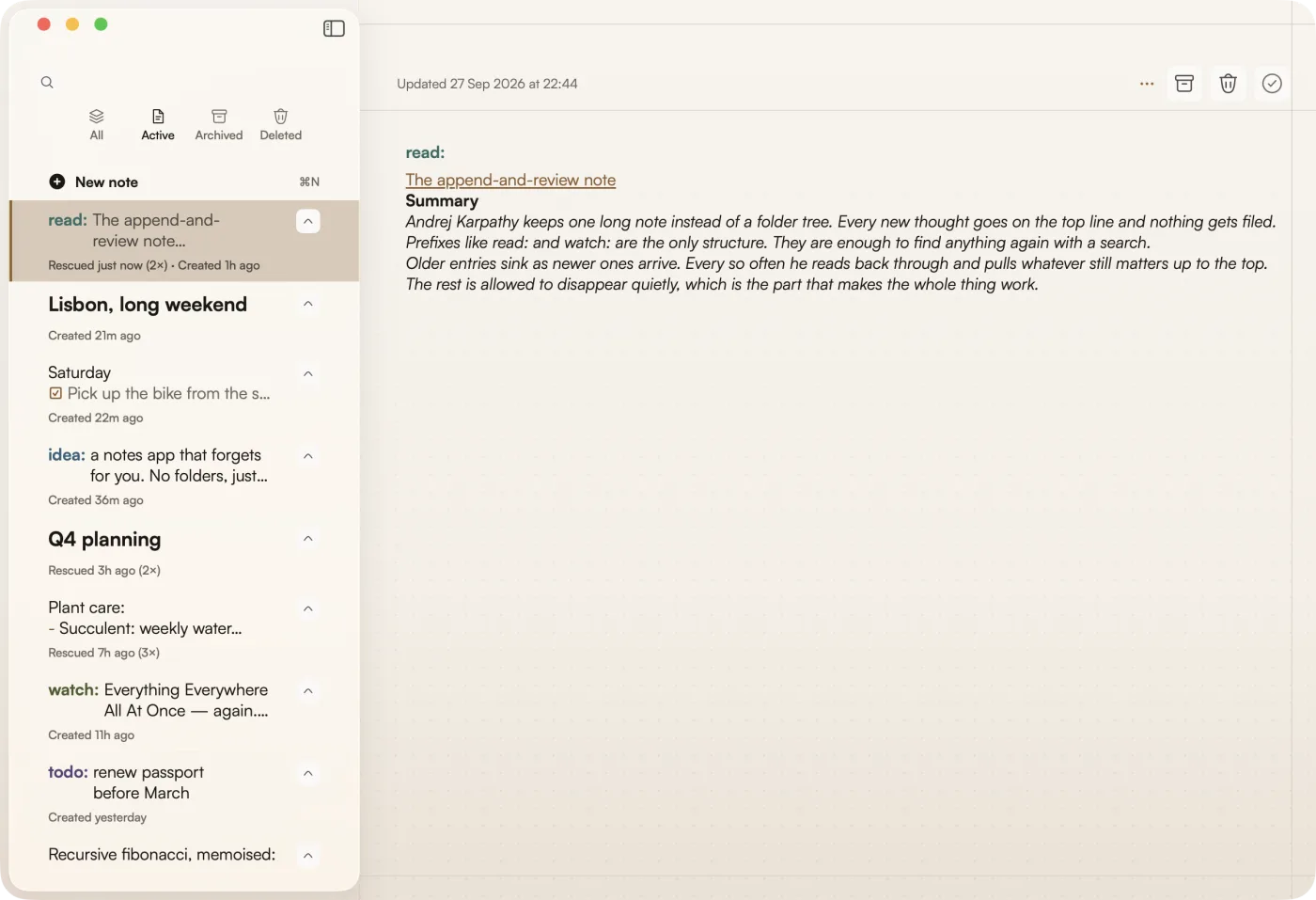
I called it Gravity because the name is the method. Thoughts sink over time unless you lift them back up.
To start the method this week, read my step-by-step guide to the append-and-review note. It covers what to write on day one, when to do your first review and how to decide what to rescue.
What it's like after a few months
Karpathy ends his post with what his note has become. "My note has grown quite giant over the last few years. It feels nice to scroll through some of the old things/thoughts that occupied me a long time ago." Some ideas sink deeper after repeated review. Sometimes he's surprised how long he's been thinking about something, and sometimes an old idea turns out to be "suddenly relevant in a new light".
Gravity gives you that experience with the copy and paste taken out. Capture takes a second and review takes a minute. The notes you keep rescuing stay near the top and the rest settle below them, so your attention goes on the notes and none of it goes on where they live.
His post signs off with "One text note ftw." Gravity is my version of that note.