Guide
Obsidian Alternatives With Less Setup (6 Apps Compared)
The best Obsidian alternative depends on what you wanted from it. Logseq is closest if you like linked notes, Notion suits shared work, Bear is a clean Markdown writer for Apple devices, Capacities and Heptabase add structure and whiteboards, and Gravity is the one to pick if the setup is the problem and you mainly want to capture things quickly. Below are all six, with prices checked against each company's own site in October 2026.
Obsidian itself is free, stores notes as Markdown files on your device, and is flexible enough that many people spend more time configuring it than writing in it. Paid extras are Sync at $4 per month billed annually and Publish at $8 per site per month billed annually. None of the apps below copy all of that.
Which Obsidian alternative is closest to Obsidian?
Logseq
Logseq is a free, open-source outliner where every bullet is a block you can link to or embed elsewhere. Notes live as plain-text files on your device, and there are desktop and phone apps. It suits people who start from a daily journal page and link bullets to other pages as they go.
The trade is that Logseq still asks you to build links and structure while you write. That's rewarding if you think in outlines. If you want to write a long, flowing document, an outline-first screen can feel like extra work. Block-based notes also differ from whole-file notes, so test a small batch before you move a large vault.
Which alternative is best for shared notes?
Notion
Notion is a cloud workspace with real-time editing, comments and permissions. It has a free plan for personal use, and paid Plus and Business plans are priced per member per month.
It's the sensible pick when notes belong to a team: meeting notes everyone edits, a shared project page, or a wiki. The cost is that your notes live in Notion's cloud instead of in files on your device. For private personal notes, or if a fast thought has to land in under two seconds, it's more than you need.
Which alternative suits Mac and iPhone users who want to write?
Bear
Bear is a Markdown notes app for iPhone, iPad and Mac only. It's free for basic use on one device. iCloud sync across devices needs Bear Pro at $2.99 per month or $29.99 per year, with a seven-day trial.
Its strength is the writing screen. Notes use tags instead of folders, and you can keep the habit of small Markdown notes without plugins or a graph. If links between notes were why you chose Obsidian, Bear won't replace that, so compare it with Logseq first. If you mostly write and then search, it's enough. My Apple Notes alternatives post covers it from the other direction.
Which alternative gives notes more structure?
Capacities
Capacities gives every note a type, such as person, book or project, with its own fields, so your notes behave like a light database. It runs on web, Mac, Windows, Linux, iOS and Android. The free plan has unlimited notes with sync and offline support. Pro costs $9.99 per month billed annually or $11.99 monthly, and adds whiteboards, task management and version history.
It suits recurring information about people, projects and ideas where each kind of entry needs a shape. It's a poor match for a single inbox where thoughts land without a category, because you spend your time choosing what kind of note you're making.
Which alternative is best for visual thinking?
Heptabase
Heptabase arranges note cards on infinite whiteboards, so you can cluster cards and draw connections. It runs on Mac, Windows, Linux, iOS and Android. Pro is $8.99 per month billed annually or $11.99 monthly, and the higher Premium tier adds more AI features.
Visual research is where it earns its price: gather short cards on a topic, then place related ones together until a theme shows. It's slow for a quick reminder, since you're working with a layout. Pick it when arranging ideas on a board is part of how you think.
Which alternative is best when setup is the problem?
Gravity
Gravity is a notes app I built around one list. New notes land at the top, notes you leave alone sink, and a swipe right rescues one you want back. You write first and never choose a folder.
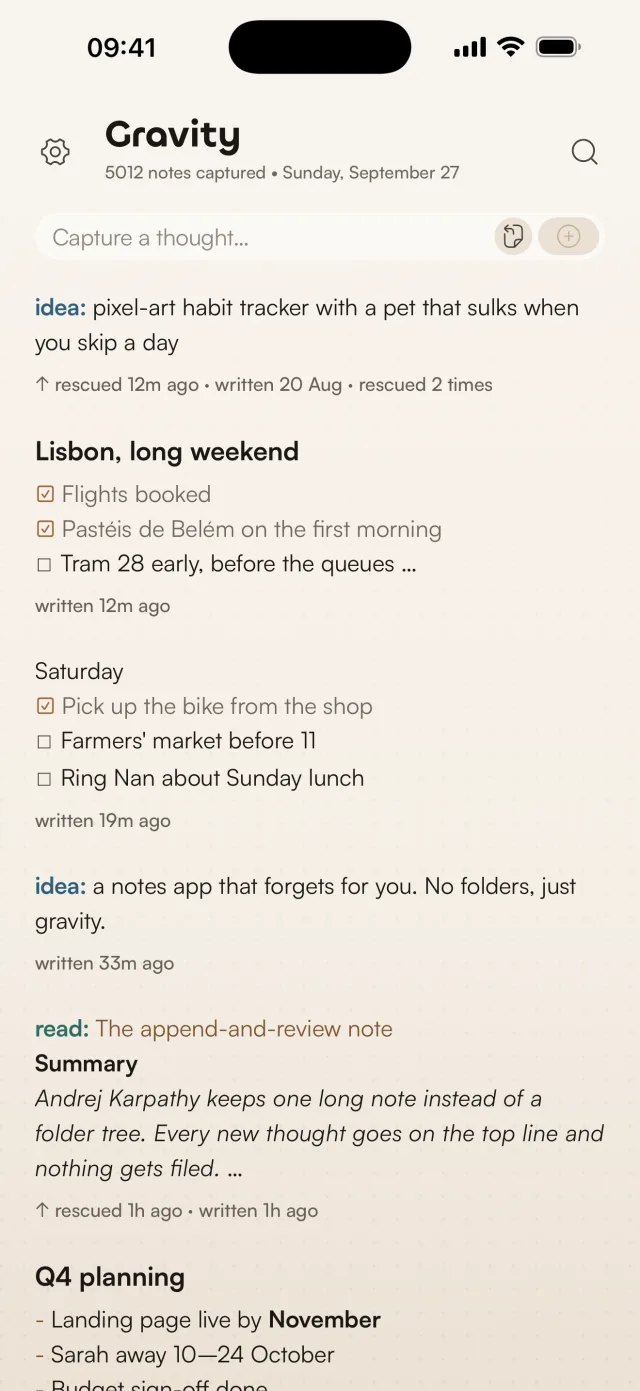
On Mac, Option-Space opens a capture panel from any app. On iPhone, the widget has New and Paste buttons and the share sheet sends text into a note. Starting a note with a word and a colon, such as todo: or read:, lets you search for that prefix later. Notes can use Markdown and checklists, search works offline, and Gravity Sync, free during the beta, keeps one list in step across iPhone, iPad, Mac and Android after you sign in with Google, Apple or an email code. You don't need an account without it. You can export as JSON or Markdown.
The app is $9.99 per platform. iCloud sync between iPhone, iPad and Mac is free, and Gravity Sync, which adds Android and your AI apps, is free during the beta and becomes a subscription after it.
Gravity has no folders, no links between notes, no graph and no plugins. If those are why you use Obsidian, stay or try Logseq. If the filing is what slows you down, the append-and-review method shows how one list works day to day, and why I won't add folders explains the trade. The import tool converts Markdown and CSV into a file Gravity can import, and runs in your browser.
How do these Obsidian alternatives compare?
| App | Best for | Platforms | Price |
|---|---|---|---|
| Logseq | Journals and linked bullets | Desktop and phone | Free, open source |
| Notion | Shared notes and teams | Web and apps | Free plan; paid plans per member per month |
| Bear | Markdown writing on Apple devices | iPhone, iPad, Mac | Free on one device; Pro $2.99 per month or $29.99 per year for sync |
| Capacities | Typed notes with fields | Web, desktop, iOS, Android | Free plan; Pro $9.99 per month billed annually |
| Heptabase | Visual note cards | Desktop, iOS, Android | Pro $8.99 per month billed annually |
| Gravity | One list for quick capture | iPhone, iPad, Mac, Android | $9.99 per platform |
My advice is to move a small group of notes first, then try your normal capture and search habits before you import a whole vault.
Frequently asked questions
Which Obsidian alternative is easiest to use?
Gravity is the simplest if your aim is quick capture without folders: type, press Return twice, done. Bear is a close second for Apple users who want to write in Markdown. The easiest choice depends on whether you want a list, a writing app or a structured knowledge base.
Which Obsidian alternative keeps notes on my device?
Logseq keeps notes as plain-text files on your device. Gravity stores notes on your device first, then syncs them across iPhone, iPad, Mac and Android with Gravity Sync if you turn it on, or across Apple devices through iCloud. Notion is cloud-based. Check where your notes live before moving anything sensitive.
Can I use Markdown in these apps?
Bear and Logseq are built on Markdown. Gravity accepts Markdown formatting and checklists, and exports notes as Markdown or JSON. The apps organise that text differently, so test your usual writing style before you commit.
Which alternative is best for shared notes?
Notion, in this list. It has real-time editing, comments and permissions. The others are aimed at personal capture, writing, structured knowledge or visual research.
How do I move my Obsidian notes into Gravity?
Use the import tool to convert a folder of Markdown files, or a CSV, into a file Gravity can import. It runs in your browser, so your files stay on your computer. Try a small set first, then check that the notes you rely on are easy to find.