Guide
Apple Notes Alternatives: 6 Apps Compared
Apple Notes is free, built in and syncs through iCloud, so switch only when you can name the problem. Bear is the choice for Markdown writing, Drafts for text you'll process later, Obsidian for a large linked library, Standard Notes and Notesnook for encrypted sync across platforms, and Gravity for fast capture in one list. Below are all six, with prices checked in October 2026.

Which Apple Notes alternative is best for writing?
Bear
Bear is a Markdown notes app for iPhone, iPad and Mac, built for writing. Markdown is plain text with simple marks for structure, such as symbols around a word for emphasis, and Bear styles it as you type. Notes are organised with tags, and you type a tag inside a note and find it again in the sidebar.
Bear is free for basic use on one device. Syncing across devices needs Bear Pro, which costs $2.99 per month or $29.99 per year, with a seven-day trial. It's Apple-only, so it doesn't help if you need an Android app. Choose it when writing and flexible tags matter more than an unfiled list.
Which alternative is best for text you'll process later?
Drafts
Drafts is a capture-first app for iPhone, iPad, Mac and Apple Watch. It opens to a blank draft, so you start typing without picking a folder. New drafts land in an inbox, and tags, flags and an archive help you sort them afterwards. Its actions then send text on to other apps.
The base app is free, and Drafts Pro costs $2.99 a month or $24.99 a year and adds custom actions, themes and workspaces. It suits a working queue: capture a line in a meeting, flag it, clear the inbox later. If you want every note to stay in a list for later review instead of an inbox you clear, that's a different habit.
Which alternative is best for a big linked library?
Obsidian
Obsidian keeps notes as Markdown files in a folder on your device, and you can nest them in subfolders, link them to each other and extend the app with plugins. The app is free for personal use, and Sync is an optional $4 per month billed annually. It runs on iPhone and Android as well as desktop.
It has the steepest learning curve in this list, and the structure is yours to design and maintain. That pays off if you enjoy organising and want a system that grows with you. If filing is what you dislike in Apple Notes, a folder tree will repeat the problem. See my Obsidian alternatives for the lighter route.
Which alternatives are best for encrypted sync across platforms?
Standard Notes
Standard Notes is built around end-to-end encryption: your notes are encrypted on your device and only you hold the keys. Its code is published on GitHub, and the free tier gives you unlimited notes on unlimited devices. Productivity costs $90 per year and adds the Super note type, folders and a year of note history. Professional costs $120 per year and adds 100GB of encrypted file storage.
It suits people who put privacy first and want notes available outside Apple devices. It's a quieter app than Apple Notes, aimed at writing more than at attachments.
Notesnook
Notesnook is an end-to-end encrypted notes app for Windows, macOS, Linux, Android, iOS and the web. Its client and server are open source, and you can self-host the sync server. The free plan has unlimited notes on unlimited devices, with 50 notebooks and 50MB of monthly storage. Paid plans start at roughly €2 per month for Essential, which adds storage, colours and notebooks.
Choose it if you switch between a phone and a computer that don't share an operating system and want encryption as the default. Notes are organised in notebooks, so it's less of a drop-in for a quick-capture habit.
Which alternative is best for fast capture?
Gravity
Gravity is a notes app for iPhone, iPad, Mac and Android, built around one list. New notes land at the top, notes you leave alone sink, and a swipe right brings one back. There are no folders, so a quick note never turns into a filing decision.
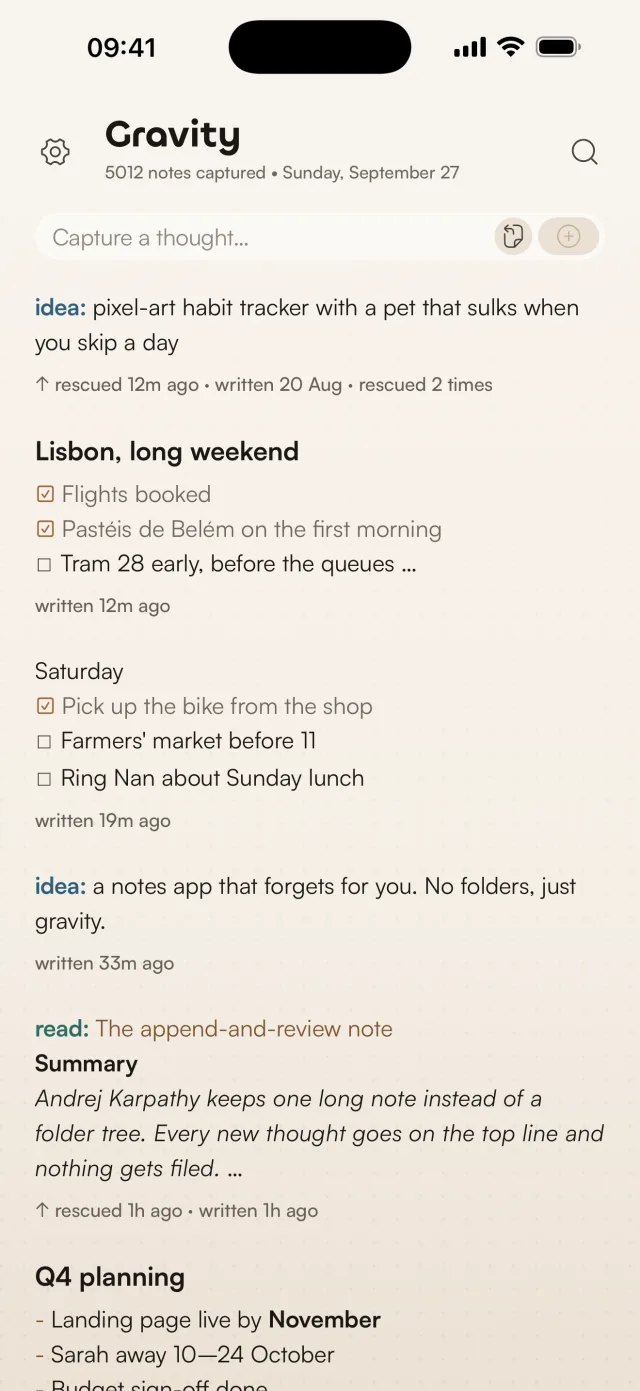
On iPhone the cursor is ready as soon as you open the app, and the widget has New and Paste buttons. On Mac it lives in the menu bar, and Option-Space opens a capture panel from any app. Type, press Return twice, and the note is saved. Search works offline, and a prefix such as todo: or read: works as a tag you can filter by, without a tag manager. Notes can use Markdown and checklists, and you can export them as JSON or Markdown.
Notes sync across iPhone, iPad and Mac through iCloud, or across those and Android with Gravity Sync, free during the beta. The app is $9.99 per platform. iCloud sync between iPhone, iPad and Mac is free, and Gravity Sync, which adds Android and your AI apps, is free during the beta and becomes a subscription after it.
Gravity has no folders, no links between notes, no collaboration and no note locking. If you rely on Apple Notes' attachments, scans or shared folders, you'll miss them. And if what you share is the chores, I made Duolisto for couples: one list, a name on every task, and no more arguing about whose turn it is to empty the dishwasher. My notes on minimal notes apps explain the single-list idea in more detail.
How do the Apple Notes alternatives compare?
| App | Good for | Organisation | Platforms and cost |
|---|---|---|---|
| Bear | Markdown writing | Tags | Apple devices; free on one device, Pro $2.99 per month for sync |
| Drafts | Capture, then process | Inbox, tags, flags, archive | iPhone, iPad, Mac, Watch; free, Pro subscription |
| Obsidian | Linked personal library | Folders, links, plugins | Desktop, iPhone, Android; free |
| Standard Notes | Private notes | Notes and note types | Several platforms and web; free, Productivity $90 per year |
| Notesnook | Encrypted notes everywhere | Notebooks and tags | Desktop, phone and web apps; free tier |
| Gravity | Quick capture, later review | One list, notes sink | iPhone, iPad, Mac, Android; $9.99 per platform |
Apple Notes still makes sense if you like its built-in access, folders and iCloud sync. If you do switch, move a small group first, such as current project notes, and keep Apple Notes untouched until you've found what you need in the new app. How to export Apple Notes shows the steps, and the import tool converts Markdown and CSV into a file Gravity can import.
Frequently asked questions
What is the best Apple Notes alternative for iPhone?
It depends on what you want to change. Gravity suits quick capture in one list, Bear is built for Markdown writing and tags, and Drafts gives new text an inbox. Start with the thing that frustrates you most and test with new notes before you move your archive.
Which notes app works across Apple and Android devices?
Gravity, Obsidian, Standard Notes and Notesnook all have Apple and Android apps. Gravity syncs one list across iPhone, iPad, Mac and Android with Gravity Sync, or across Apple devices through iCloud. Standard Notes and Notesnook use end-to-end encrypted sync. See also Apple Notes on Android.
Can I use an Apple Notes alternative for free?
Yes. Standard Notes, Notesnook and Obsidian have free versions, Drafts has a free base app and Bear is free on one device. The app is $9.99 per platform. iCloud sync between iPhone, iPad and Mac is free, and Gravity Sync, which adds Android and your AI apps, is free during the beta and becomes a subscription after it.
How should I move notes out of Apple Notes?
Move a small group first. Check that headings, lists and any formatting you rely on survive, and keep the originals until you've found everything you need. Apple's export is one note at a time, so plan accordingly.