Blog
Why most note-taking apps don't work for ADHD
You open a notes app to catch one thought, and it asks which notebook, which folder, whether you'd like to add tags. You hesitate for three seconds, and by the time you've picked a folder the thought has gone.
That's a design problem as much as a memory problem. Most notes apps ask for exactly the kind of effort ADHD makes hardest: a steady stream of small, unrewarding decisions about where things go and what to do with them later.
I'm not a clinician, and this isn't medical advice. It's how I think about designing a notes app so it asks less of you.
Executive function, folders and tags
ADHD is often described as trouble paying attention. The researcher Russell Barkley frames it instead as a problem with executive function and self-regulation: the capacity to plan, prioritise and keep working towards a goal, especially at the moment it's needed.
The CDC's page on ADHD in adults lists difficulties that will sound familiar to anyone who's abandoned a notes system: staying organised, finishing long tasks unless they're interesting, and keeping up healthy habits consistently.
Most productivity tools assume you can reliably make good decisions about structure and priority, and then keep making them. They assume executive function is on tap. For a lot of people with ADHD, it isn't.
Why "try harder" doesn't work
One of Barkley's central points is that people with ADHD are helped more by changing their environment than by trying harder. He argues for support "at the point of performance": putting reminders, cues and structure in the place and moment where the behaviour has to happen, instead of relying on knowledge or willpower.
In a notes app that means a few things. Ask for fewer decisions, because every "where does this go?" uses up a limited supply. Make the right behaviour the default, so the app does the organising and you don't have to. And move memory and priority out of your head and into something that doesn't get tired.
That's why elaborate notes systems often fall apart with ADHD. Folders need a categorising decision every time. Tags need a vocabulary you remember. Links need you to remember what connects to what. Each one is another small tax on executive function.
What makes a notes app ADHD-friendly?
Before looking at any particular app, these are the things I'd check:
- Capture is instant, with no choices before you can type.
- Everything goes to one default place, so you never wonder where you put it.
- It still works after you ignore it for a week.
- Old ideas come back into view without you scheduling it.
- Search works, for the dull but important things you'll need to find.
If an app misses these, it's asking for executive function you may not have to spare that day.
A simple routine: capture, review, rescue
Gravity replaces constant self-management with one short loop:
- Capture. Open the app and the cursor is already at the top of the stream. Type the thought and press Return twice. There's nothing to choose.
- Review. Scroll through now and then.
- Rescue. If something still matters, swipe right and it goes back to the top.
- Let the rest sink. Anything you don't rescue drifts down and out of your daily view. It's still there, and search still finds it.
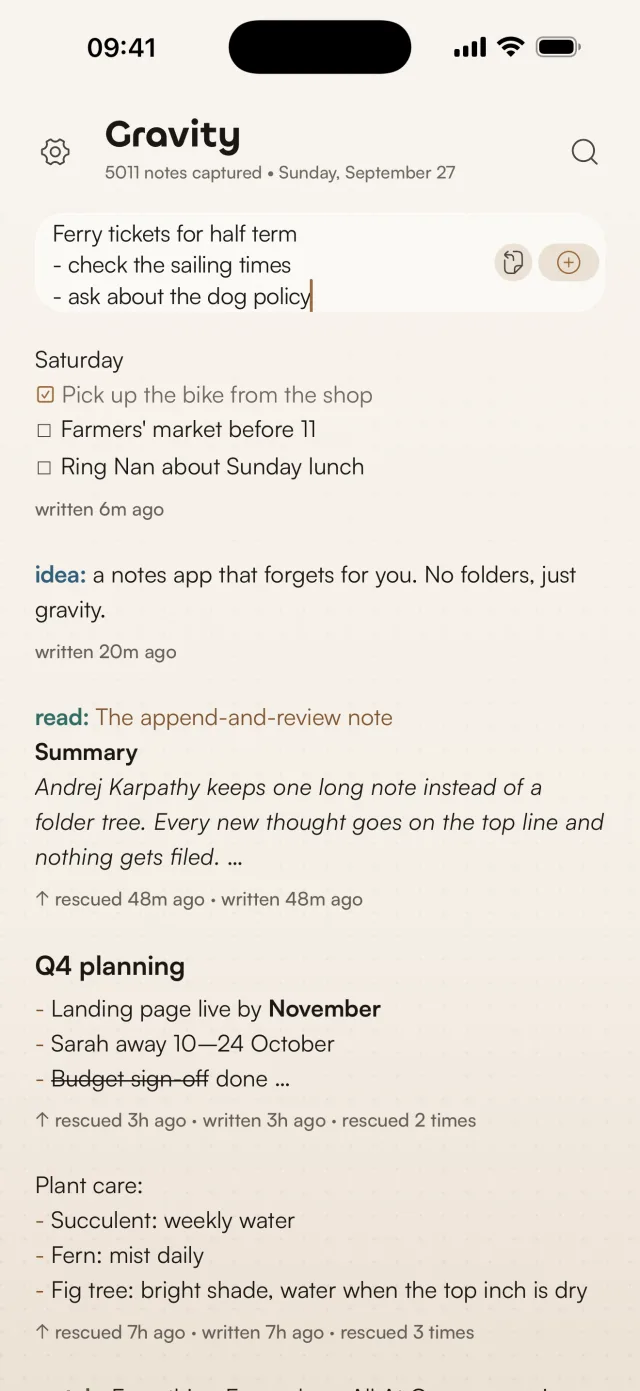
There are no folders to keep tidy, and no weekly review ritual to become one more abandoned commitment. Your attention does the organising.
Why sinking helps
Most apps make you decide what to delete or archive, which is another executive-function demand. Gravity reverses that. You don't have to decide what to remove. You only have to notice what still matters.
Everything else looks after itself. Notes you don't engage with sink, the way unreinforced memories fade, and on your phone they also fade a little as they age. That takes away a tiring background pressure to manage, curate and maintain. There's nothing to fall behind on, because there's no system to keep up with.
A two-minute version to try today
- Write one note per thought, with no organising.
- Once a day, scroll for 30 to 60 seconds. That's the whole review.
- Swipe right on the one to three things that still matter.
- Put anything time-critical in your calendar. Don't rely on noticing it in time. The calendar is for deadlines, and the notes are for thoughts.
If you miss a day, you scroll a bit further next time. Nothing breaks.
If typing is the bottleneck, the Gravity widget on your home screen opens straight into a new note, or pastes in whatever you last copied.
Common objections
What about important things that aren't interesting?
Start them with a prefix like ref: or admin:. Type ref: into search and the insurance policy number is right there. Keep boring but necessary information out of the way of your attention. The stream isn't for that.
What if I forget to review?
Then you scroll a bit more next time. Unlike a folder system, there's no backlog to fall behind on. The notes that matter keep getting rescued, the rest sink, and the stream works whether you open it daily or weekly.
Fewer features, less to manage
Gravity has no folders, templates or plugins, and its only tags are the words you type at the start of a note. I explain why in no, we're not adding folders.
Every feature a notes app adds brings new decisions, new systems to maintain and new ways to fall behind. With ADHD, each of those costs more.
Gravity asks very little of your executive function. Write when you think of something, glance through when you feel like it, and rescue what grabs you. For a brain that struggles with self-regulation, that's the point of it.