Blog
Interstitial journaling: a real day of entries, a template and an app
Interstitial journaling is keeping a journal in the gaps between tasks. Each time you switch from one thing to the next, you write the time and a line or two about what you just did, how you feel and what comes next. By the evening you have a time-stamped record of where your attention and energy went, written while it happened.
Tony Stubblebine, who later became CEO of Medium, coined the term in an article for Better Humans called "Replace Your To-Do List With Interstitial Journaling To Increase Productivity". Anne-Laure Le Cunff of Ness Labs helped popularise it, and describes the journal as "a to-do list, a note-taking system, and a way to track your time meaningfully". It works because you write in the moment. You record what happened instead of what you remember happening, and the times let you compare one day with the next.
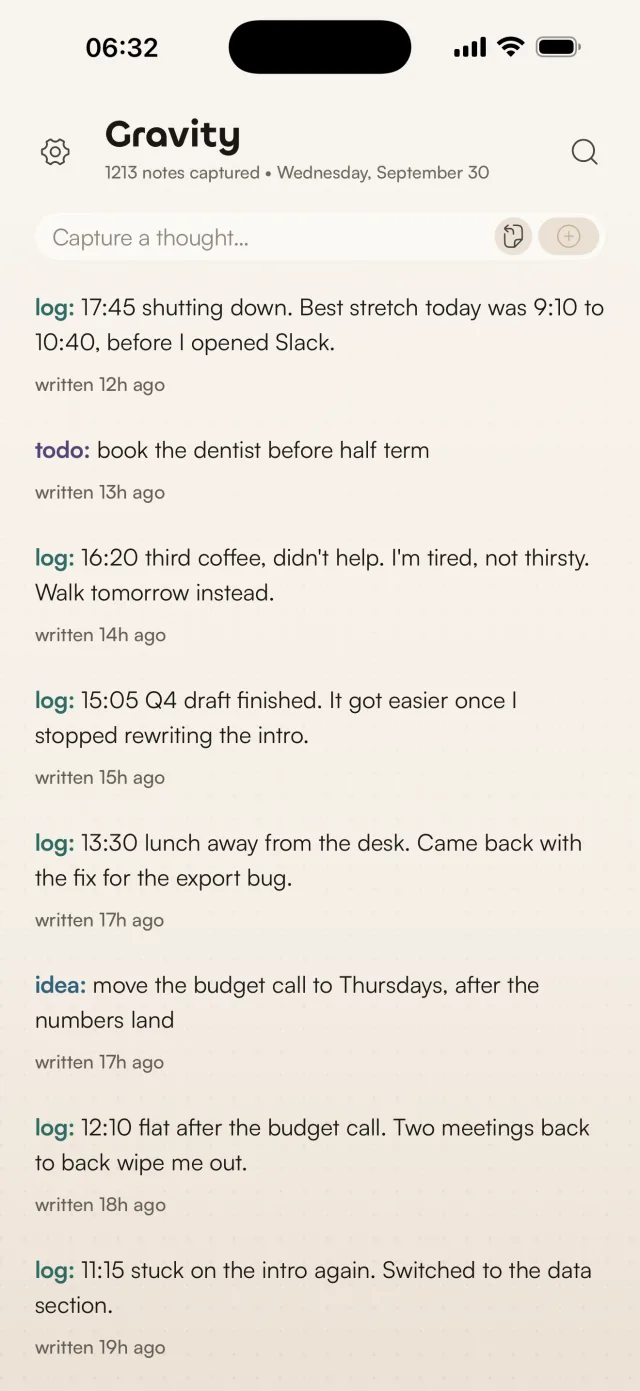
I keep mine in Gravity, the notes app I make. The screenshots on this page show an example day in the iPhone app.
Why write in the gaps between tasks
The gaps are where a working day leaks. Between tasks you check your phone, open a tab, wander off. Writing a line at that point closes the last task and names the next one. Le Cunff makes the point that it also shows you how long your breaks take, because you have to write down when they start.
The time-stamp does the rest. A journal written at night is a reconstruction. You sit down hours later, try to recall the day, and your memory fills the gaps with a tidy story. Psychologists call this reconstructive memory. An entry written at 12:10 that says "flat after the budget call" is evidence, and a week of entries like it tells you when you think well, what drains you and what you keep putting off. Writing it down also clears it from your head, and your brain wasn't built to remember everything.
Pilots keep flight logs and scientists keep lab notebooks for the same reason. An interstitial journal is field notes on your own day.
An example day of interstitial journaling
Here's one working day, the same one you'll see in the screenshots further down. Each entry starts with log:, which Gravity turns into a tag, and two other notes landed in the stream along the way.
log: 08:30 plan: Q4 draft, budget call at 11:30, export bug after lunch.
log: 09:10 deep work on the Q4 draft, flowing. Phone in the other room.
log: 10:40 Sarah pinged, lost the thread. Slack stays closed until 11 tomorrow.
log: 11:15 stuck on the intro again. Switched to the data section.
log: 12:10 flat after the budget call. Two meetings back to back wipe me out.
idea: move the budget call to Thursdays, after the numbers land
log: 13:30 lunch away from the desk. Came back with the fix for the export bug.
log: 15:05 Q4 draft finished. It got easier once I stopped rewriting the intro.
log: 16:20 third coffee, didn't help. I'm tired, not thirsty. Walk tomorrow instead.
todo: book the dentist before half term
log: 17:45 shutting down. Best stretch today was 9:10 to 10:40, before I opened Slack.
That's nine log entries, each under twenty words. Read back the next morning, they say four things:
- The best focus ran from 9:10 to 10:40, with the phone in another room, and ended when Slack came back. The fix is already written in the 10:40 entry: Slack stays closed until 11.
- Two meetings back to back left nothing for the hour after. The
idea:note moves one of them to Thursdays. - The export bug got fixed after lunch away from the desk. A proper break did more for it than another hour at the screen.
- The third coffee at 16:20 didn't help. The problem was tiredness, and tomorrow's answer is a walk.
There's a smaller pattern too. "Stuck on the intro" at 11:15 and "got easier once I stopped rewriting the intro" at 15:05 are the same lesson, four hours apart. From memory you'd never connect them.
An interstitial journaling template
Each entry answers up to four prompts. One line that covers two of them is plenty.
- Time. Put the clock time at the start:
14:15. - What I just did. Finished, dropped or interrupted, and by what.
- How I feel. Energy, mood or focus, in a word if that's all you have: flat, flowing, wired, restless.
- What's next. The next task, or a rule for tomorrow.
Copy this and fill in the blanks:
log: HH:MM just did ___. Feeling ___. Next: ___.
On a day when even that feels like too much, write the time and one word about your energy. "14:15 tired" is still a data point. Don't judge an entry while you write it. I record every thought and let review sort it out later, and the journal works the same way.
Interstitial journaling examples for different kinds of work
The template bends to whatever your day is made of.
A software developer:
log: 09:40 PR review done. Two nits, one real bug. Next: the flaky login test.
log: 11:05 lost 40 minutes to a Docker cache problem. Annoyed. Adding the fix to the README.
log: 15:30 pairing went fast. Next: deploy, then nothing clever.
A writer:
log: 08:15 400 words before breakfast, easy. The scene works better from Anna's side.
log: 10:50 research rabbit hole on 1970s ferries. Fun, not useful. Back to the draft.
log: 14:00 flat. Editing instead of drafting this afternoon.
A student:
log: 10:00 enzymes lecture, lost it after 40 minutes. Rewatch from 38:00.
log: 13:20 library, phone in bag. Two past-paper questions done. Next: essay plan.
log: 16:45 group chat ate half an hour. Muted until 6 tomorrow.
Several of these contain a small decision, like "muted until 6 tomorrow" or "adding the fix to the README". Those are the entries worth keeping when you review.
How to review an interstitial journal
Reading the entries back is where you learn something. I do it in two short passes.
At the end of the day, take five minutes. Read the day in order and write one closing entry that names the best stretch and what ended it. The 17:45 entry above is a closing entry.
The next morning, take two minutes before you start work. Read yesterday's closing entry and any rule you set yourself. This is the moment "Slack stays closed until 11" turns into something you do.
As you read, look for:
- when your focus was best, and what came before it
- what ended your good stretches: a message, a meeting, hunger
- the same sticking point showing up more than once
- what you reached for when tired, and whether it worked
- decisions you wrote down and haven't acted on
Then rescue. Pick the one or two entries that should shape tomorrow and move them to the top of your notes, where you'll see them first. Let the rest sink without guilt. It's the append-and-review habit I use for all my notes, taken from Andrej Karpathy's single-note method, applied to a journal.
Once a week, read the whole week's log in one sitting. Single days are noisy, and five of them side by side show the patterns. Over a few months the entries you keep rescuing become a record of what you care about, which is attention doing the organising.
An interstitial journaling app: how I do it in Gravity
You write a dozen entries a day, each in the thirty seconds between one thing and the next, so a tool that makes you find today's page or pick a notebook first loses you by lunchtime. Gravity is a one-stream notes app built for quick writing, and it fits interstitial journaling well.
It opens ready to type. The cursor is in the capture box at the top of the stream. Type log: 14:15 flat after the call, press Return twice, and the entry is saved. The New button on the home screen widget gets you there in one tap. There's more on quick capture and search in Gravity.
Every entry is time-stamped. Each note shows when you wrote it, "written 12h ago", or the date once it's more than a week old. I still type the clock time, because it reads better in a list and stays with the text when you export.
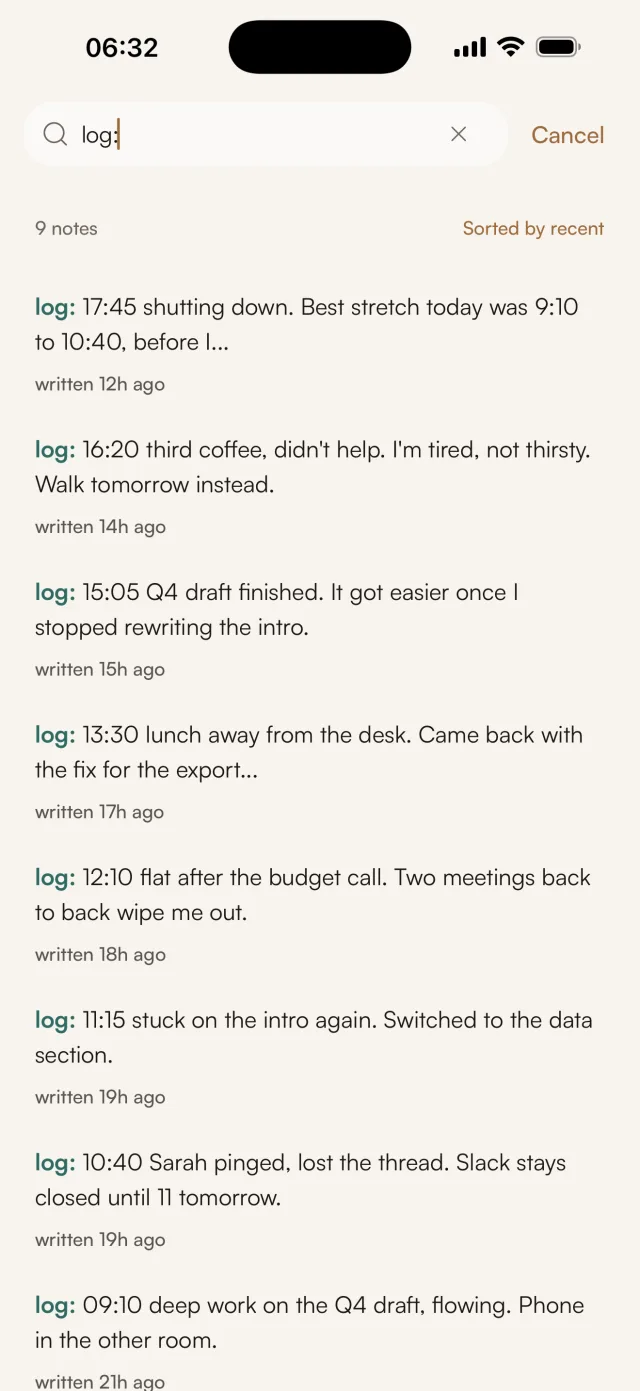
The log: tag filters the day. A word and a colon at the start of a note becomes a coloured tag, so log entries stand out from the to-dos and ideas around them. On iPhone, iPad and Android, open search, tap log: under Your tags and sort by recent. That's your journal, newest first, with nothing else mixed in.
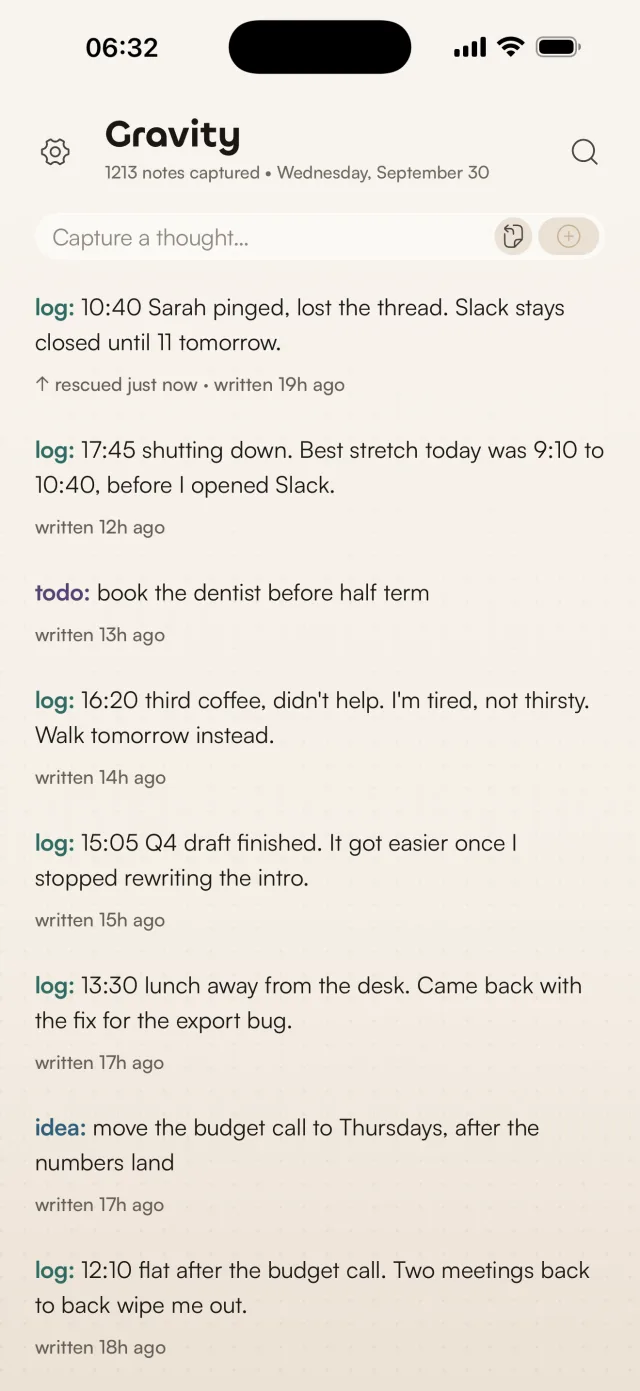
Rescue keeps the lesson on top. Swipe an entry right, or press R on the Mac, and it jumps to the top of the stream marked "rescued just now", with a count of how many times you've rescued it. Yesterday's rule then sits above everything you write today. On iPhone, iPad and Android, entries also turn lighter in steps as they age, after a week, three months and a year, and rescuing one makes it dark again.
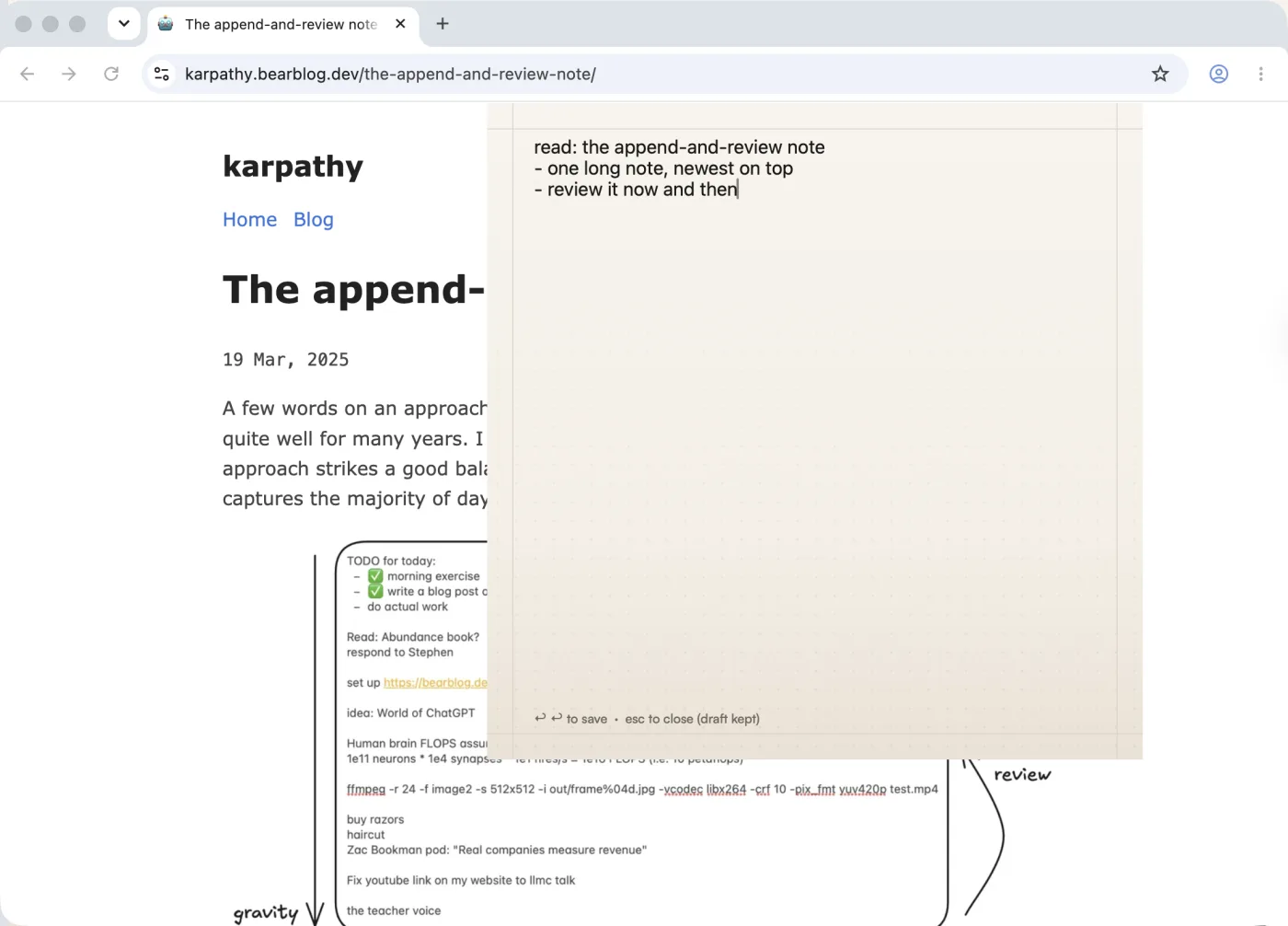
The Mac app lives in the menu bar. Option-Space opens a capture panel from any app, so an entry costs a few seconds and you're straight back in your work. Option-Shift-Space adds to your last note instead, which suits anyone who prefers one running note per day.
It's private. A journal holds things you wouldn't say out loud. Gravity has no account, no analytics and no crash-reporting SDKs, and your notes live on your device. On iPhone, iPad and Mac you can turn on iCloud sync, which runs through your own private iCloud database. It's a private place to journal with nobody else in the loop.
Gravity is a one-time purchase, $9.99 in the US, with no subscription. The iPhone app runs on iPad too.
Other ways to keep an interstitial journal
A pocket notebook and a pen cost almost nothing, and you write the time yourself. A notes app works if you keep one note per day and add to the top. A bullet journal handles it with rapid logging, one short line per entry. People who already live in Obsidian often use a daily note with a time-stamp shortcut.
Gravity handles the loop around the entries. It opens ready to type, time-stamps every entry without asking, filters the journal with one tag, and gives the review a gesture of its own. With paper or a daily page, each of those steps is yours to do by hand.
Start tomorrow
- Put Gravity, or whatever you'll use, on your home screen.
- At every task switch, write
log:, the time and one line. - At the end of the day, read it back for five minutes and rescue one entry.
Give it a week before you judge it. One day shows you a few things, and a week shows you your habits.
Questions about interstitial journaling
What is interstitial journaling?
Interstitial journaling is writing a short, time-stamped journal entry each time you switch tasks. You note the time, what you just did, how you feel and what's next. Tony Stubblebine coined the term, and the practice combines a journal, a to-do list and a time log in one running list.
How is interstitial journaling different from a regular journal?
A regular journal is written once, usually at night, from memory. An interstitial journal is written through the day, a line at a time, as things happen. Each entry takes seconds, the record is more accurate, and the time-stamps let you compare one day with another.
How often should you write an entry?
At every task switch, and whenever you notice a shift in energy or mood. The example day above has nine log entries. A day of long meetings gives you fewer, and the gaps between the times tell you something too.
Interstitial journaling vs bullet journal: what's the difference?
A bullet journal is a paper planning system: future logs, monthly logs, and daily lists of rapid-logged tasks, events and notes. Interstitial journaling is one habit, writing the time and a line at each transition, and its focus is observation: how your day went, recorded as it went. You can keep an interstitial journal inside a bullet journal's daily log.
Does interstitial journaling work for ADHD?
It asks very little of you. Each entry is one line with no decision about where it goes, and the time-stamps keep a record of the day that doesn't depend on memory. Those are the two things I'd look for in any tool for an ADHD brain. I've written more about why most note-taking apps don't work for ADHD and what helps instead.
What's the best app for interstitial journaling?
Look for an app that opens ready to type, time-stamps every entry for you and lets you pull the journal out from everything else. Gravity does all three: the cursor is waiting when it opens, every note shows when it was written, and on your phone the log: tag gives you the day's entries as one list. It runs on iPhone, iPad, Mac and Android, with no account.
Is interstitial journaling the same as time tracking?
No. Time tracking records what you did and for how long. Interstitial journaling also records what you noticed: energy, reactions, stray ideas and decisions. You get the times for free, and the sentences explain them.